← All skills

Skill

Motion planning

Finding motions that reach a goal without hitting anything, and timing them so the robot can follow. ArmGroup's joint two-arm planning, SKIDADDLE's physics-aware paths and the peg reset.

5 log entries3 projects

OpenDubsBest example

N arms, one planner: ArmGroup

Pull request

Also shows: PythonSimulation (MuJoCo)

The lab plans with its own MuJoCo planning library, mj_manipulator, which planned one arm at a time. With two arms on one torso, two plans that are each safe can still hit each other. I added an ArmGroup to it that plans all arms' joints together, so every step is checked arm against arm. On the clip's goals, the two arms planned separately collide in 58 of 210 frames; ArmGroup's plan bends one gripper about 16 cm around the other and touches in none. The same group plans to joint goals, gripper poses and lockstep Cartesian paths, keeps 5 mm between all geometry, retimes the trajectory at 125 Hz, and re-checks it at every sample. I made single-arm planning a one-arm group, and ArmGroup is what plans both arms on the robot today.
The same goals, each arm planned on its own (left, red while they intersect) and planned together by ArmGroup (right). The lines are the grippers' paths. MuJoCo, real time.
A two-arm handover planned with ArmGroup in MuJoCo (the can is carried kinematically).

FIRST Tech Challenge

SKIDADDLE: a path follower that plans with physics

Code

Also shows: JavaOpen source

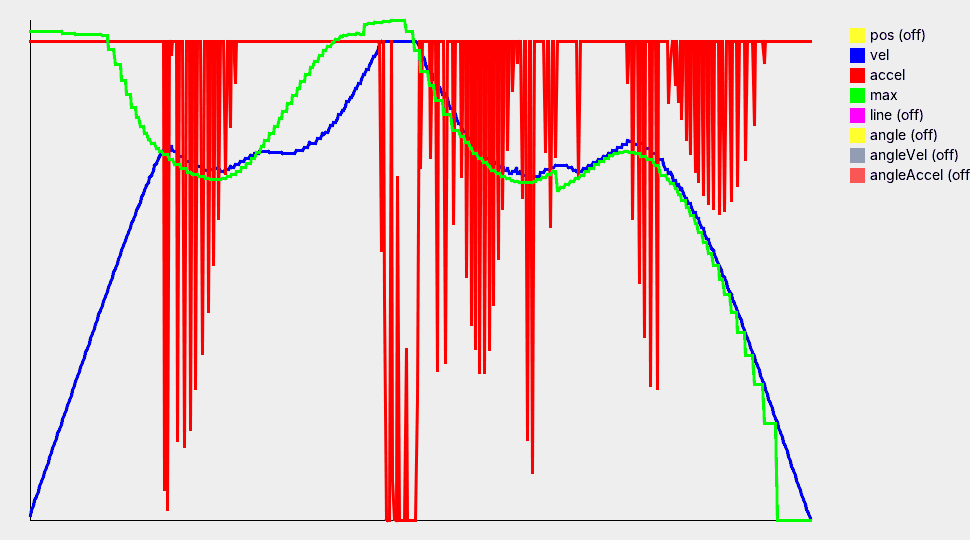
SKIDADDLE is a path-following library for FTC robots, written in Java, that I built to fix inefficiencies in Road Runner, the usual FTC path library, and get better paths. It plans with a physics model of the robot, and I derived all of its math by hand, myself, without AI or earlier work to build on. A path, a cubic Bézier for autonomous or a Hermite spline built on the fly in tele-op, is flattened into straight segments by adaptive De Casteljau subdivision, and a curve whose turns would need more than the robot's acceleration is relaxed until they don't. Every loop it splits the robot's velocity into a convergent part, toward the goal, and a transverse part, everything else. It first spends its acceleration budget cancelling the transverse part, then speeds up the convergent part, so from any starting position or velocity the robot converges on the path. A look-ahead over the stopping distance sets the fastest speed for each corner, and the robot switches segments when its braking distance says it must. Heading is a separate controller, and the result goes through PIDF and feedforward to the four wheels. A simulator draws the field and graphs every step.

SKIDADDLE's own simulator following a cubic Bézier path, in real time.
Line chart over the run: blue speed rises, follows the green speed limit through the turns and falls to zero at the end; the red acceleration sits at its cap and drops whenever the speed reaches the limit
The simulator's graph of the same run: speed (blue) tracking the look-ahead's speed limit (green), acceleration (red) mostly at its cap.

OpenDubs

Running both arms at once

Bimanual refactor

Also shows: PythonROS 2

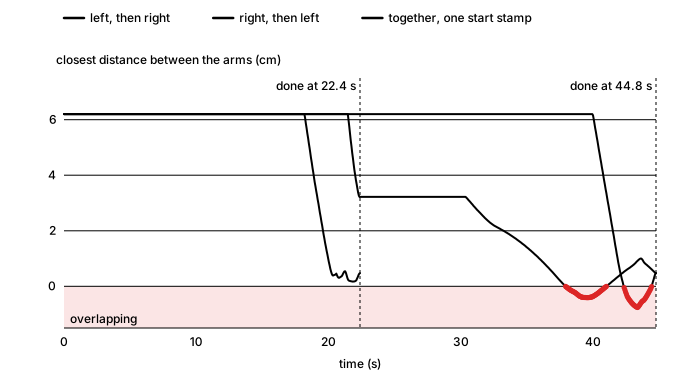
A two-arm plan is only safe if both arms run it together: it was checked with each arm where the other would be at the same instant. On hardware, though, mj_manipulator_ros, the lab's layer that runs those plans on the robot, ran multi-arm plans one arm after the other, which doubled the time and passed through states the planner never checked. Replaying the crossing plan that way in MuJoCo and checking every fourth of its states, the arms intersect in 97 of 1,400.

I rebuilt execution so every arm starts its trajectory on one shared start stamp: the trajectories must share their timestamps, one stamp a moment in the future is computed once, and each arm sends its goal from its own thread against that stamp, so the motors start together however long each goal takes to send. If any arm fails or is aborted, a shared event cancels the others mid-motion. Running two arms from two threads also meant making the shared code thread-safe: both threads stepped one MuJoCo model, and concurrent runs crashed until I serialized every access to it behind one lock. To bring it all up on the real robot safely, I built a hardware-in-the-loop bring-up protocol.

Line chart of the closest distance between the two arms over time for one crossing plan. Run left then right or right then left, it takes 44.8 seconds and dips below zero, the arms overlapping, near the end. Run together from one start stamp, it finishes at 22.4 seconds without overlapping
The same plan run the old way and together: how close the arms come, and when each run finishes.
Both arms moving at once on the robot, September 22.

Fleet RL

Resetting the peg without a person

Code

Also shows: Robot learningPython

In online RL an arm practises a task over and over, so after every try something has to put the peg back where the task starts. I built that reset for the peg-insertion task. A teammate and I designed the tagging together, and they wrote the code that reads it: ten AprilTags on the peg's faces, from which the scene camera solves the peg's full pose. I calibrated each camera with a ChArUco board, first its lens (the intrinsics), then its pose relative to the arm (the extrinsics). For the second, a calibration script has the arm set the tagged peg down at a grid of spots on the board and fits the arm's joint zeros and the camera's pose to where the arm thought the peg was against where the camera saw it. With that, the reset finds the peg anywhere in the workspace, works out how it is lying, and plans every waypoint of the pick and the place before the arm moves, choosing the grasp the arm can reach with the least travel within its joint limits. It then checks where the peg landed. This lets the teammate's automatic success detection score each try, so the arms can run online RL on their own. The reset has run on a real arm; the clip shows the same planner in simulation.

Four resets from four scrambled spots, planned by the reset code and shown in simulation at 2× speed.
Four views of the square peg with a tag on the top, the bottom and two on each side face, numbered 0 to 9, with a red arrow marking each tag's top edge
Where the ten tags go on the peg.

FIRST Tech Challenge

Reworking SKIDADDLE's control

Code

Also shows: Java

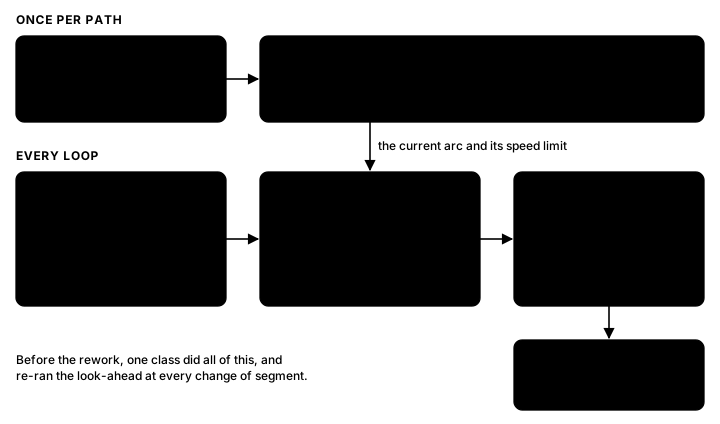
Over winter break I took SKIDADDLE apart into pieces that each do one job. Controllers now only ask for accelerations: one along the path, one back onto it, one for heading, each with a weight and a priority. A scheduler runs whichever are active, and a default controller brings the robot to a stop when none are. A new allocator turns the requests into motor space and hands out each motor's remaining headroom, highest priority first and shared by weight within a priority, so correcting off the path can come before speeding along it without any motor going past its limits. The look-ahead, before the most expensive part of the loop, became a precompute: when a path is made, one backward pass finds the fastest speed the robot can enter each turn at, so the loop only reads it.

Diagram: once per path, a path generator feeds precomputed speed limits; every loop, controllers send requests to a scheduler, which feeds an allocator that drives the wheels
The follower after the rework.

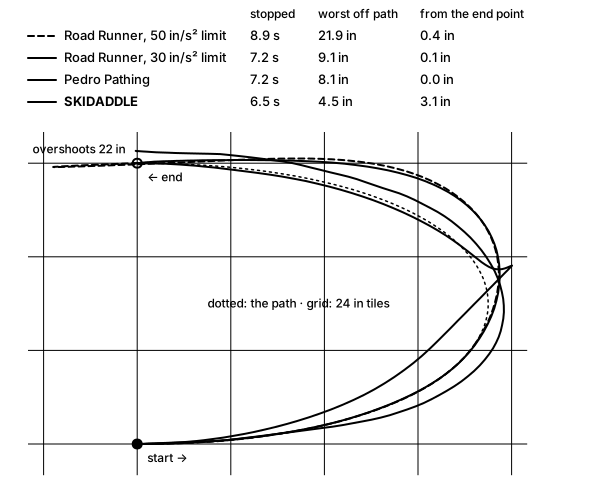
Planning in motor space means a turn's sideways acceleration comes out of the same wheel budget as speeding up and slowing down. Road Runner limits acceleration only along the path, so on a tight hairpin at the same limits its plan asks for more grip than the wheels have, falls behind and overshoots the end. With its limit lowered to 30 in/s² it stays within 9 in; SKIDADDLE stays within 4.5 in and stops 0.7 s sooner. It isn't ahead everywhere: on sharp corners Road Runner with the lower limit tracks tighter, and the rework doesn't correct sideways error yet, so it can stop a few inches off the end point.

Four runs around the same hairpin. Road Runner at the shared 50 in/s² limit falls behind in the curve and overshoots the end by 22 in. With its limit lowered to 30 it strays 9.1 in and stops after 7.2 s. Pedro Pathing strays 8.1 in and stops after 7.2 s. SKIDADDLE strays 4.5 in, stops after 6.5 s, and ends 3.1 in from the end point
Simulated: one mecanum robot model and the same speed and acceleration limits for all three. Road Runner 1.0.1 and Pedro Pathing 3.0.2 run from their source; SKIDADDLE's plan is followed with feedforward and a position term.