← All skills

Skill

Networking

Moving data between machines. The VLA harness talks WebSockets, ZMQ and HTTP, and the Quest teleop page streams poses over a websocket.

3 log entries3 projects

Benchmarking VLAs for ARCHITECTBest example

An evaluation harness for any VLA

Code

Also shows: PythonRobot learning

Every VLA ships its own server, and they don't agree on how to talk: openpi's π0 and π0.5 use WebSockets, GR00T uses ZMQ and MolmoAct2 uses HTTP. I wrote one harness that hides all of that behind a single interface: a new model, task or whole benchmark is a short YAML file, not new code.

On the robot, the harness asks the policy for a chunk of actions, runs eight of them open loop, then asks again, recording the scene and wrist cameras throughout. The operator scores each rollout, everything is saved as it goes so an interrupted run resumes, and one script turns the results into success rates per task and per prompt.
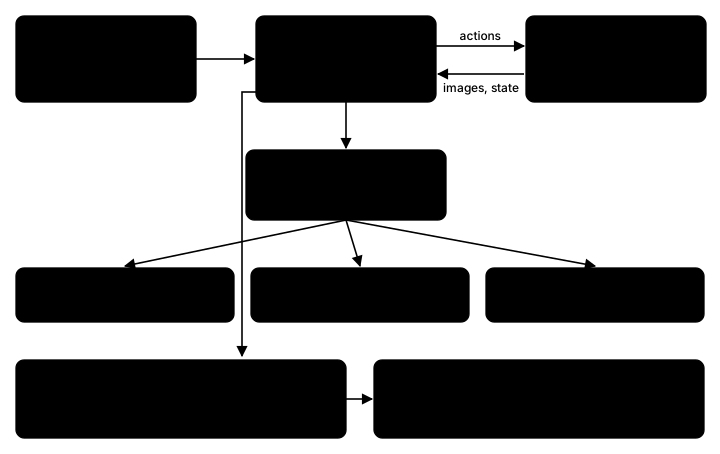
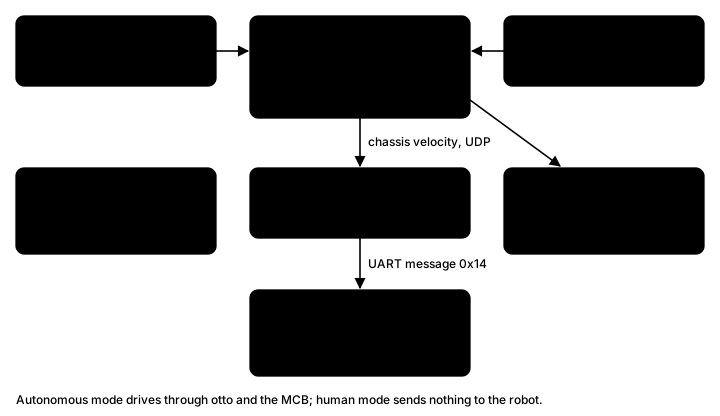
Diagram of the harness: YAML configs feed run_eval.py, which drives the DROID robot and asks one policy client for chunks of actions; the client reaches π0 and π0.5 over WebSocket, GR00T N1.7 over ZMQ and MolmoAct2 over HTTP; every rollout's scores and videos go to a results folder that compute_results.py turns into CSVs
How a run fits together.
π0.5 putting the banana on the plate.

OpenDubs

Teleop with a Meta Quest, in the browser

Code

Also shows: TeleoperationPython

For demonstrations and live driving, I built teleop with a Meta Quest. The apps I tried had no passthrough and left me dizzy, so I wrote my own: instead of an app on the headset, the robot serves a page the Quest's browser opens in AR, so the operator still sees the room, and the page streams both controllers' poses, grip and trigger to the robot over a websocket. Holding a grip engages its arm, and the trigger works the gripper. The headset's page goes dark once it enters AR, so the robot also broadcasts that live telemetry to any other browser pointed at it, and someone at a laptop can watch exactly what the operator is sending. It matches the old SDK's interface, so switching was a one-line change. I built it against the arms in MuJoCo first; at first the loop couldn't keep up, and the bottleneck turned out to be publishing the sim viewer over the network, not the control.

Teleop on the robot after the speed-ups.
My teleop loop in MuJoCo, fed two scripted hands (the spheres): the repo's limits (left) and raised ones like the robot's now (right).

Advanced Robotics at UW

A test platform against motion capture

Code

Also shows: Experiment designPython

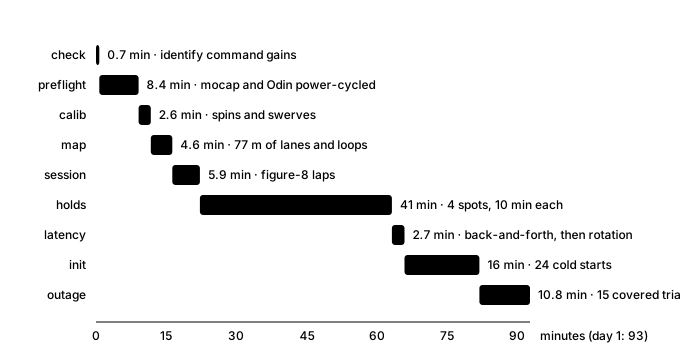
The sentry localizes with an Odin1, a lidar-inertial sensor that relocalizes into a prebuilt map. Before the team decided whether the whole localization system could rely on it alone, we wanted to know how accurate it is and where it is weak. So I built a test platform that measures it against the motion capture room, whose OptiTrack tracks the robot to a fraction of a millimeter. It starts and stops the sensor, records every run, guides whoever is driving with live mocap feedback, and can also drive the robot itself through the Jetson and the robot's controller, with a watchdog and speed caps. A campaign day runs a fixed protocol: calibration spins, a mapping drive, figure-8 laps at set speeds, ten-minute holds, back-and-forth motion to measure latency, cold starts, and outages where someone covers the sensor.

Diagram of the system: motion capture and the Odin1 sensor feed the characterization scripts, which record every run and write a report; in autonomous mode they send chassis velocities over UDP to the Jetson, which forwards them over UART to the sentry's motor control board
The three parts, and the default human-driven mode.
Bar timeline of day 1: preflight 8 minutes, calibration 3, mapping 5, figure-8 laps 6, holds 41, latency 3, cold starts 16, outages 11; 93 minutes in all
Day 1, step by step, from the campaign's time estimate.